Battery draining

ScanWatch
Answered

Comments

  • Ian W
    2

    likes

    @Nigel you can contact Withings support. I did so via chat, took a few months but they replaced my watch eventually (with a ScanWatch 2 which I don't like as much as the first version). Had no battery life issues since.

    2

    likes

  • posy_eds
    1

    likes

    I have managed to fix the problem. I have an iPhone, what I did was uninstall the withings app, and uninstall the apple health app, reinstall the withings app and tell it not to pair with any app. First of all I restored the watch, and now it consumes about 3-4% of my battery per day. I hope it helps you.

    1

    likes

  • Hayley H
    1

    likes

    Exact same problem. My batter used to last a month and now I’m lucky if I can get a week. I’ve done all the resetting and even turned off some functions that I like to have on in order to extend battery life. Nothing has worked. Surely there is a fix by now? It would be truly unfortunate if it was a plot to get you to buy the new watch. Mine is still under warranty.

    1

    likes

  • carrer_major88
    1

    likes

    The same issue here. Also, I cannot find the way to access and ask in Withings. Any help on what to do? Thanks ahead.

    1

    likes

  • Anders L
    1

    likes

    Now I've tried uninstalling the Huawei apps (for my Huawei watch) - just in case it might interfere. (similar to the iPhone case above) It didn't help. I haven't seen any sign of activity from Withing's support. It is quite obvious that the problem occured when softare version 2741 was installed. Why not just offer an option to "downgrade" if they are unable/unwilling to fix a new bugfree version?

    1

    likes

  • mealosh
    3

    likes

    Well. I stopped using my scanwatch. Bought Huawei watch gt 3 pro and am totally satisfied.
    The French from withings had enough time to solve the problem (over 6 months).
    From my perspective, the quality of withings products is questionable.
    In the future I am not expecting to buy anything from it.

    3

    likes

  • Andrew M
    1

    likes

    Just the same issue. Got it in the end of summer. First couple of month 20-25 days as usual (had Steel HR before). And at the end of autumn it turned into 7-8 days. 10 days max. It's really frustrating and disappointing. Have no STRAVA, made a factory reset of the watch, reinstalled the app. Nothing helps. Will try to make a warranty claim as my watch was bought 9 months ago.  

    1

    likes

  • punk.koala8408
    1

    likes

    I'll add my experience to the list.


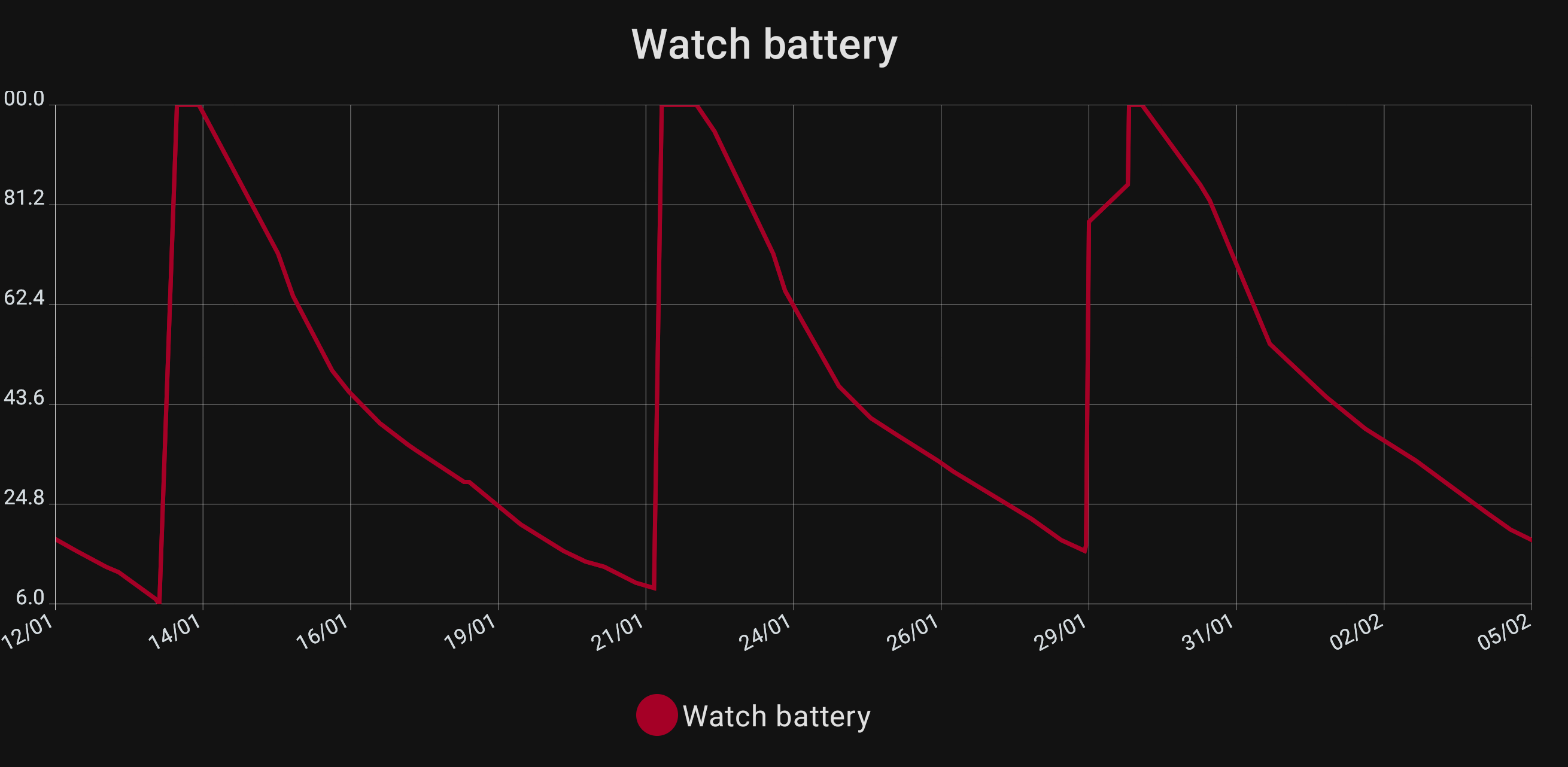
    I bought a ScanWatch in April 2023, and for the first months, I barely had to care about the battery life as it would drop by only a few percents every day. After a few months (not sure how many, maybe 6), the battery level was diminishing significantly faster, and after a full charge the battery would last around 7 days.


    I have not enabled any "high power consumption" features, and I don't think I every changed any setting after the initial setup.


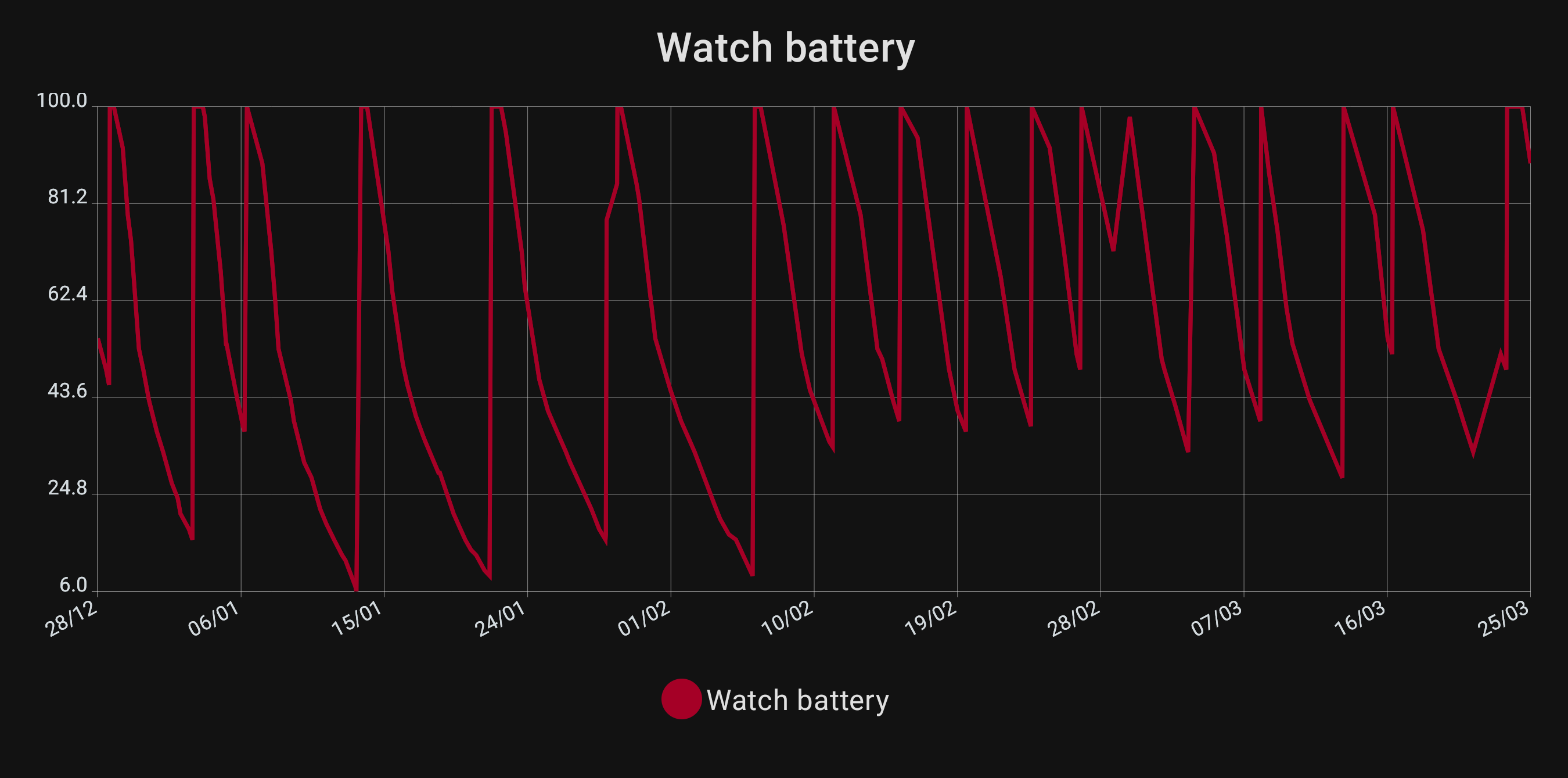
    I have kept track of the battery level since the beginning of the year. For the first month, I kept Bluetooth disabled on my phone to see if it made any difference, and I could not notice any.


    Here is the graph of the battery life over the last 4 months

    (In the first half, I deliberately let the battery go down to below 10 % to see how long it would take.)


    If I zoom a bit on the first part, we can see that the battery lasts around 7 days:


    1

    likes

  • Andrew M
    1

    likes

    Hope Withings team is working on the problem and it could be solved with upgrade (or downgrade perhaps ))) . I think the issue is completely  in the firmware. 

    1

    likes

  • allsjc
    2

    likes

    Just purchased a Withings Horizon watch. Love the watch and features but after fully Charing to 100% it is now at 44% less than 2 days later. So would not last more than 4 days after full charge. All settings on except quicklook and respiratory monitoring. Not sure if a problem with the watch or app but as new thought best just to return. After returning item found this discussion and now so glad I did return watch. It's not very comforting that a quality item is followed up with mediocre (non-existent) support. My carry away is that it was 5 months ago that Withings confirmed an issue and as yet have provided no fix or update. It does seem from responses that this is a tactic to force an upsell to their latest model. 

    2

    likes

  • Eiji T
    0

    likes

    改善しました!

    2023年11月より同様の事象が発生していましがた、2024年4月上旬に改善し、4日間で0%になっていたバッテリー残量が11日で41%残りとなりました。 まだまだ経過を観察する必要がありますが、状況を共有するためにコメントします。
    (改善前)Healthmate 6.3.1 android13 scanwatchfw2741
    (改善後)Healthmate 6.3.1 android14 scanwatchfw2741
    ※Healthmateアプリ設定は心拍・呼吸ともON(自動)
    実施したことは以下の2点です。
    ①Andoridバージョンアップ 13→14
    ②時計裏面のセンサー清掃
    ②は効果として考えにくいので、実際にはAndoroidバージョンアップが効いたのではないかと考えます。
    今回のバージョンアップはScanwatchバッテリー問題解決を期待して行ったのではなく、電話に通常のOSバージョンアップ通知が来たのでそれに従っただけです。 (不思議です)
    ただし、改善して以降はHealthmateアプリ起動時に同期が繰り返していたのが1回で100%同期完了となりスムーズです。 この状況から、異常なバッテリー消耗はscanwatchとアプリの同期時のBluetooth通信の不具合によるリトライ多発の可能性があると感じます。
    そこがAndroid14へのバージョンアップでscanwatch(2741)との通信が正常化された可能性があります。
    参考になれば幸いです。

    0

    likes

  • Gary D
    1

    likes

    The following is a translation of a post on this subject translated from the original Japanese.


    Eiji T Improved! A similar phenomenon had been occurring since November 2023, but it improved in early April 2024, and the battery level went from 0% in 4 days to 41% in 11 days. I still need to monitor the progress, but I'll comment to share the situation. (Before improvement) Healthmate 6.3.1 android13 scanwatchfw2741 (After improvement) Healthmate 6.3.1 android14 scanwatchfw2741 *Healthmate app settings are for both heart rate and breathing (automatic) We implemented the following two points. ①Andorid version upgrade 13→14 ②Clean the sensor on the back of the watch ② is difficult to consider as an effect, so I think that updating the Android version actually helped. I did not update this version in hopes of solving the Scanwatch battery problem, but simply followed the normal OS update notification I received on my phone. (It's strange) However, after the improvements were made, the synchronization went from repeating when the Healthmate app was launched to 100% synchronization in one go, and everything is smoother. Based on this situation, I feel that the abnormal battery consumption may be caused by frequent retries due to a Bluetooth communication problem when synchronizing scanwatch and the app. Communication with scanwatch (2741) may have been normalized by updating to Android 14. I'm glad if you can use it as a reference.

    1

    likes

  • Sabbe B
    1

    likes

    I am also having this issue lately!
    I have disabled all notifications and other possible functions but as of the writing moment it has dropped from 100% to 50% in less than 48 hours!?!
    What is the solution Withings?

    I'm running Android 14 and the latest available software for the watch. 


    1

    likes

  • Permanently deleted user
    1

    likes

    Hi..

    I picked up the ScanWatch in December 2022 and have loved the batterytime.
    My watch battery lasted about 14-20 days with daily exercise registred by the watch.
    But now I'am glad if it makes 3-4 days but I have switched of a lot of functions that I had active before.

    My problem seems to be strictly the ScanWatch software or bad batteries.

    The Android softwear working ok, without draining the phone. 

    What shall I do??  (...we?)

    MAC Address: 00:24:e4:ee:e4:17
    Software version:  2741

    Leif Forsstrom

    1

    likes

  • Vladislavs K
    0

    likes

    I'm on the same page :(
    Luckily in my case it's a warranty issue, but "unluckily" - I 've got the link, that I can't print to send the ScanWatch. Well, in that case I suppose it's the contractor failure, still awaiting for response.


    The battery drained from 20-22 days on first monts to just 3-4 days with the same or even smaller usegae (no dayly ECG or CO2 measurments needed anymore).

    0

    likes

  • Aki T
    0

    likes

    Same issue with my Scanwach for some time. Have tried all I can do. Very sad and dissapointed with Withings customer service because this thread is allready 8 months old! The issue still exists! So this might be the end of life of the original Scanwach. I liked the watch. It was somehow extraordinary. Now I decited to go back to my previous watch which still gets updates and new features after its release in 2017. If this would be the Scanwatch update policy, it is not long enough for me.
    Have I missed the solution offered by customer service? I hope so.

    0

    likes

  • Karl M
    0

    likes

    This is still an issue.

    0

    likes

  • jay3
    0

    likes

    Same issue here, just that it went from 2-3 weeks to 3-4 hours pretty much without translation.
    I will try to run it without Bluetooth tonight to see if the issue is linked to the App…

    0

    likes

  • Ahmed H
    0

    likes

    The withings scale is less that 15 months old. The battery was drained out, so I charged it via the micro-usb port to 100%. In three days the battery is completely drained out. I use iphone app to see my readings and not android.
    How do I solve this problem

    0

    likes

  • Larry I
    0

    likes

    For the last three weeks the battery has been draining rapidly, losing about 25% battery per day (so I'll be lucky to get 4 days before charging).  I have shut off all battery draining services.  I am using an Android phone running Android version 14.  I noticed that Android came out with a security updated on August 5, 2024, which is about the same time I started having the issue.  I saw the response from Withings at the top of this page (that Android 14 might be the culprit), but that was written 9 months ago.  I have bought 2 Steel and 1 Scan Watch from Withings and will definitely be looking at another solution if this is not fixed.  Please advise what I can do?  

    0

    likes

  • Josephine From Withings
    0

    likes

    Hi everyone,


    Thanks for all your posts. I'm sorry to hear about the short battery duration you are experiencing with your ScanWatches. I appreciate the details you shared. The battery of the ScanWatch is rated to last up to 30 days. Keep in mind, however, that the use of the silent alarm, workout mode, ECG feature, SpO2 feature, respiratory scan, Quick Look feature, and notification feature will impact the watch's battery life.


    Note that the use of the 'Always on' setting for the Respiratory Scan will reduce the battery duration to 5 days.


    The more that the workout mode is used (such as when running or working out) or if you receive many phone, text, or calendar notifications, the less the battery will last in between charges. This can explain why you may experience a shorter-than-expected battery duration.


    An article for a table that shows the different watch features and their impact on power consumption is available on our Help Center page -ScanWatch-How-long-can-the-battery-of-my-watch-last?


    For further assistance, please reach out to us at https://bit.ly/3Lg5tPL.


    Cheers,


    Jo, Withings Customer Service

    0

    likes

  • Pablo U
    4

    likes

    Lol, one year after I started this post Customer service keeps using the same arguments to justify the problem of the battery drain. Jo, we don't need a reminder that the use of the silent alarm, workout mode, ECG feature, SpO2 feature, respiratory scan, Quick Look feature, and notification feature will impact the watch's battery life. You know tha the problem exist even if everything is off. It's funny to see that you waited a whole year to answer this post and you still don't give any solution.... 

    4

    likes

  • Malek B
    0

    likes

    i had mine for 2 years now. Battery is still phenomenal (3 weeks+).

    My main concern was to have maximum battery life, so that i can use it for running and travelling.

    Therefore i disabled everything I did not need. To achieve maximum battery life, I did the following:

    Disabled ALL notifications except Health Mate, Find My, Messages, Phone and Revolut.

    Disabled Quicklook

    Disabled automatic brightness

    Put manual brightness at 20% (slider is around that, i don't see a % number)

    Disabled detection of atrial fibrillation

    Disabled reminders of activities

    Disabled detection of high resting heart rate

    Disabled keep screen ON when training

    Breathing detection: automated

    Oxygen saturation: during sleep


    Then on my phone, notofications:

    for Find My, I enabled only urgent alerts (my elders), other are scheduled

    for Message, I enabled only urgent alerts, the rest is scheduled at intervals

    I suspect some of the people in this thread have enabled everything, which will definitely drain the battery if the watch is constantly monitoring you, or sending notifications, or is bright.

    Language of my watch is set to another language, so if you don't get my translated terms, dig for it :-)

    0

    likes

  • Sabbe B
    1

    likes

    @Malek B, 
    What you did is the same as going back to the old days of Activité Pop days and basically losing the hole point of the Scanwatch! As many have states before, all was working fine with most settings enabled as  out of the box and the battery time was just fine. But then it has turn so bad after a couple of month (in my case).

    When buying such a product for me at least the battery time was the biggest point! And it going this bad is a big deal breaker and a big step down on quality for Withings! 
    I've bought my first Withings watch in 2015 and have been upgrading since and had no complains until now :( 

    1

    likes

  • Richard K
    1

    likes

    Hi, is there any solution to this issue? Firmware 2741 is the only available FW and the battery drains within days. Did you all replace your watch or was there any other solution?
    I was happy with the Scanwath product but it seems this was the last Withings I bought

    1

    likes

  • Kees J
    1

    likes

    I think it is absolutely ridiculous that Withings has not fixed this issue after more then a year of complaints by a great number of their clients. The answers from Withings I have read in these posts display a total lack of interest in the customers issues. It is very clear to me as an IT guy with some 40 years experience that the issue has always been the 2741 firmware upgrade. Period. The advise of Withings support staff to switch of all "battery consuming" functions is laughable. My watch has all the function set to OFF. No alarms, no automatic measuring, no warnings, no gps nothing. Battery used to work 30+ days with these settings. Upgraded the firmware to 2741 and the troubles started. 

    I specifically bought the Withings watch because of the battery life. Since Withings displays an unbelievable arrogance in dealing with their customers, this will be the first and last item I ever bought from this company. An iWatch only lasts 18 hours, but at least Apple is honest about that fact, and the watches perform exactly as advertised by Apple. 

    1

    likes

  • E S
    1

    likes

    You just wait to the day the battery goes so swollen that the back cover pops off. And yes, I think it’s ridiculous selling a product with the strength put on the long-lasting battery and advicing to turn off most of the watch features in order to make it last —which is not recognizing they’ve got a problem and completely abandoning the user. It’s like recomending to leave your car in the garage so it won’t consume gas. Not a good strategy. My last Withings gizmo, this ex-client says.

    1

    likes

  • Kees J
    0

    likes

    Just read the post of posy_eds who claims to have fixed the issues by uninstalling the app on iPhone AND uninstalling Apples "Health" app. Reinstalled the Withings app, and will monitor battery usage over the next few days.

    In any case, posy_eds your suggestion makes sense. Maybe interested in a support job at Withings?


    0

    likes

  • Kees J
    0

    likes

    I did what posy_eds suggested yesterday evening a phone only lost 4% battery overnight. I'll charge the watch now completely and will monitor the battery over the comings days. But I am hopeful :)

    0

    likes

  • Kees J
    1

    likes

    Charged the battery until 100% 7 hours ago. Now, 7 hours later, still at a 100%. So for me this indeed fixed the issue I think. Will check th battery tomorrow morning again, but I am very hopeful.


    So thanks to posy_eds suggestions, I think the problem is fixed.  If anybody wants to try this solution (on iPhone)

    here are the steps:

    1- Remove the Withings App from your iPhone.

    2- Remove the Apple Health app from iPhone

    3- Reset your watch to factory defaults.

    4- download and install the Withings app

    Good luck.


    1

    likes

Leave a comment as