On my Scanwatch 2 connected to Pixel 7 Pro on Android 15, notifications are not working since App version 7.3.1.
Also in the new Android App version 7.3.2 notifications are still not working.
Has anyone noticed the same?

24 comments
12 likes
On my Scanwatch 2 connected to Pixel 7 Pro on Android 15, notifications are not working since App version 7.3.1.
Also in the new Android App version 7.3.2 notifications are still not working.
Has anyone noticed the same?
likes

Hello,
Thank you for reporting the notification issue you're experiencing with your Scanwatch 2. I am sorry to hear that you're not receiving notifications since updating the app.
We are actively investigating this notification case. Your report, along with the confirmation from another user, is very helpful in our troubleshooting process.
Our team is working to identify the root cause and implement a fix as quickly as possible. In the meantime, we recommend ensuring that notification settings are enabled both in the Withings app and in your Android phone's settings for the app.
If you need additional assistance, please contact us at: https://bit.ly/3Lg5tPL.
Have a nice day,
Lyn, Withings Customer Service

Yes, Same for me in Scan Watch 1, Android 15, App Version 7.3.2, Xiaomi Redmi Note 13 Pro + 5G
likes

For me too, all notifications are no longer forwarded after a while. Apps like Whatsapp, messages, HomeKit and phone calls. When I open the Withings app it goes just as well for a short time, unfortunately this problem keeps repeating. The ScanWatch Nova a factor Reset given and reconnected with Bluetooth but unfortunately no solution... and no I don't close the app hard, just open it in the background. iPhone 15pro iOS 18.4 ScanWatch Nova 2 SW.2651
likes

I am currently having the same issue, when I go far from the phone i stop receiving notifications and I have to open the app in the phone to make it work. However, whenever I go far again I have to open again the app and it is quite annoying…
iPhone 15 Pro iOS 18.4
likes
The issue has been in many App versions and still is (since weeks) in Android App Version 7.4.
Looks like Withings is not interested or able to fix this!
What a shame!
https://support.withings.com/hc/en-us/community/posts/34057921844881
https://support.withings.com/hc/en-us/community/posts/33972330936849
https://support.withings.com/hc/en-us/community/posts/32706197778193
likes

yes it is same with my steel.
likes

I have exactly the same problem. With 2 Withings watches! So far, there seems to be no update of withings that could solve this problem.
likes

I no longer receive notifications. I’ve restarted both devices and paired them again. I have the app running in the background, but nothing.
I was warned that the ScanWatch after-sales service was bad—I didn’t believe them. No solution for a €300 watch.
likes

Been having the same issue since the update. Notifications work for a while after I refresh the app settings and then stop. I hope there is a fix identified for this. Thank you.
likes

I've had the same issue since day one of my journey with Nova. The notification settings are a bit odd. It would be much simpler if the watch just mirrored the phone's notifications. My Suunto handles this very efficiently—it forwards all phone notifications based on the native iOS notification system. There's no need for the Suunto app to run in the background.
By the way, does anyone know what the bright / blue border on the left side of app selection row means? Some apps have it, while others don't.
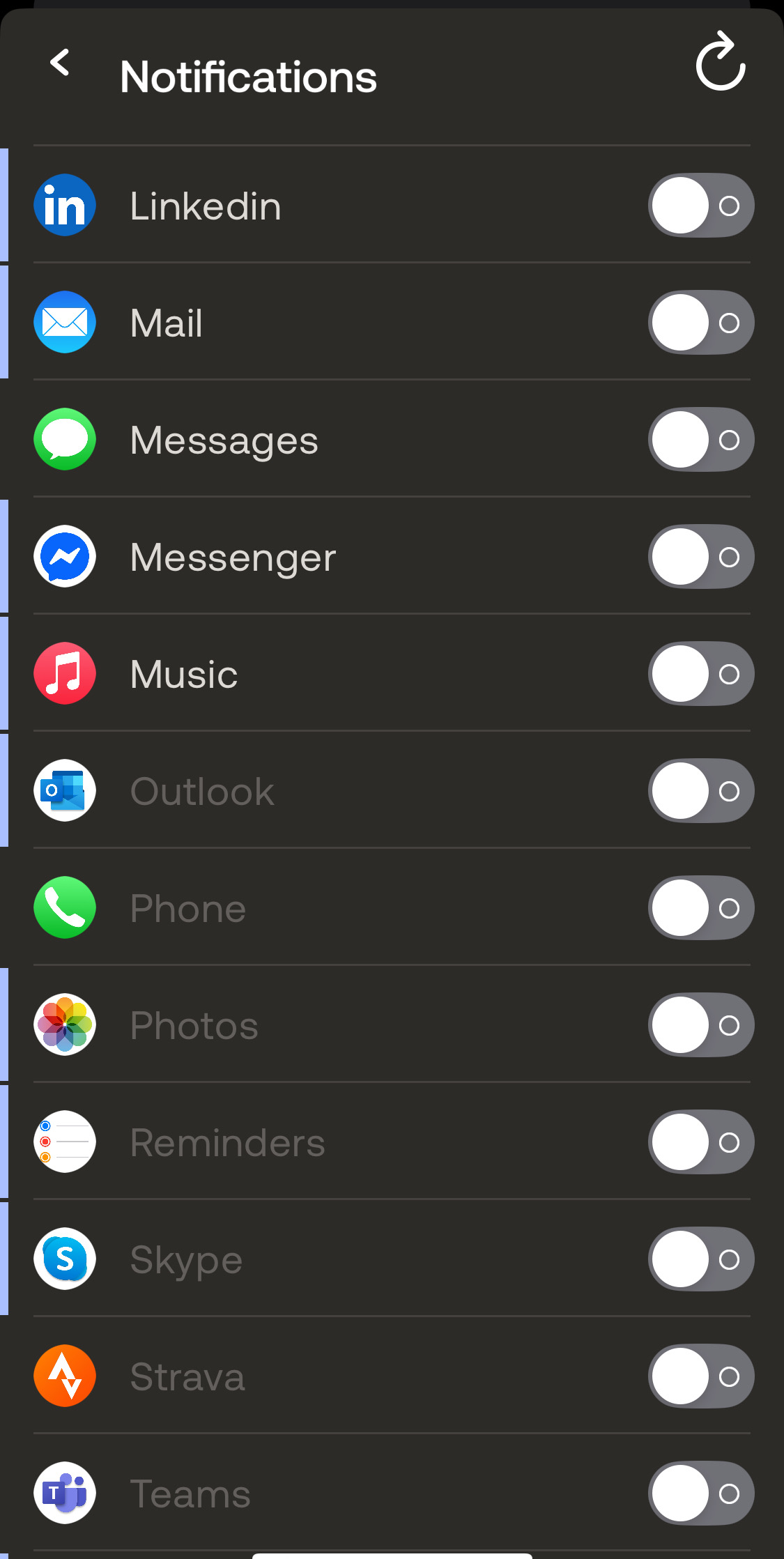
likes

I have a similar notification problem with Apple iOS. It appears that my phone and watch lose their connection after an hour or two and I will no longer receive notifications. I can have the phone in my pocket the entire time but suddenly I no longer receive notifications on the watch. When I open the app it briefly shows the message "looking for your device" then "loading" as it transfers the data. After that I will start receiving notifications on the watch. I never use to see that "looking for your device" message unless the phone had been well away from the watch for a period of time. From my experience with an iPhone it appears that the connection with the watch keeps dropping and then no notifications can be received. Opening the app reestablishes the connection. I hope the provides some useful info for the development folks to find the problem.
likes

I'm having an ongoing issue with iOS and my Withings ScanWatch 2 where the connection with my iPhone drops after a while—or when I go out of Bluetooth range and return. Bluetooth reconnects, but I still don’t get notifications until I manually open the Withings app. The app then shows "looking for your device" and then reconnects. This wasn’t an issue in the previous version of iOS, so something seems to have changed. It’s really frustrating, as notifications are the main reason I use the watch. I hope this helps identify the issue.
likes

I have an updated iPhone and IOS and the synchronization and notifications work perfectly for me... maybe it depends on the phone model or that something fails in the bluetooth or the watch
likes

I am experiencing the same issue on iOS 18.5.
likes

I don’t receive any notification with my brand new smartwatch 2 on iOS 18.5 on iPhone 12 mini.
What a shame Withings didn’t do anything… very disappointing with this company
likes
Notifications are still not working, since Android App version 7.3.1. released on February 26, 2025 !
@Withings, I think it's time to give us a release date for the fix or an option (instructions) to return the watch.
likes

Artur W Did you find out what blue line was? I’m not getting notifications & WhatsApp has the blue line next to it
likes
Hi Emma,
No, I still haven’t found out what the blue line means. Notifications don’t work—regardless of whether the blue line is shown or not. There have been ongoing issues with notifications for months, and @Withings has done nothing to resolve them. A huge disappointment, which is why my recommendation is: DON’T BUY WITHINGS.
likes

What’s up, clowns? You fired the decent developers, and now it turns out your fancy AI tools can’t even fix a bug? You should’ve fired your marketers instead. Fix the bug, urgently! It’s been 2 months — this is a core feature of your watch. Or are you gonna refund us for a useless product?
likes

I have the same problem. As mentioned above.ä, this is a core feature. You need to fix this asap.
likes
Ok. WHY YOU CAN'T JUST ROLLBACK TO THE PREVIOUS VERSION??????
Don't you know how to use git? 2 MONTHS!!!! TWOOOO MONTHS!!! rollback and fix it as long as you wish
likes

Received an update to the iOS app yesterday (app version 7.5), updating the app didn't fix anything so I did the following:
Now the notifications have worked since then.
Edit: And the notifications stopped working. So, if the upcoming firmware update doesn't fix this I'll be returning to my four year old 200€ Suunto 5 - that still works reliably.
likes
I updated to lates iOS app version and restarted my iPhone last week. The app no longer loses it connection with the watch which means I am now receiving all of my notifications on the watch. Previously I would get notifications for a couple of hours before the Bluetooth connection between the watch and app would drop requiring me to open the app to reestablish the connection. Connection and notifications have been uninterrupted for nearly a week now, so I believe the issue is fixed.
likes

Once again, my notifications stopped working, so I deleted the app, reset the watch and reinstalled everything like last time (3 months ago). Unfortunately, it seems I cannot pair with the watch anymore.
I left it for 12h, 24h, charged it for 12 and 24h aswell. But it's been since the 13 august that I can't even just pair to have the time on the watch.
This is unbelievable it's not even 6 months old.
I am searching for a return or refund policy, where can I find it?
likes
Leave your own comment
Leave a comment as