Bug v8.4
43 comments
8 likes
likes
43 comments
8 likes
likes
I thought I'd update my comment as this still doesn't seem to be resolved by Withings. My device is working fine now after resetting it. I'd say the repeatable way to fix it (most important points bolded) is:
1. Factory reset your watch.
2. Disable bluetooth so your phone doesn't try to connect to the watch (might not be needed).
3. Dissociate your watch in the app.
4. Re-enable bluetooth on your phone. Clear app cache / data (android, might not be needed).
5. Delete and reinstall the app. (also might not be needed)
6. Re-pair your watch with the app and go through the setup process.
You will lose any health data not synced from your watch, which was 2 weeks worth of data for me.
likes
May as well go back to manual scales and write the measurements on a pad with a pen like the old days. So frustrated with Withings right now.
likes
Withings, please revert the Google Play app to 8.3.anything... 8.4.* is a complete disaster even when assessed at the ridiculously low standards I associate with Withings as your long term customer. My Scan Watch 2 doesn't sync, app (8.4.1) doesn't load (Pixel 10 Pro with Android 16). Revert your app to something your customers can actually use or at least communicate awareness of an issue and a timeline for resolution.

likes
I’ve given up trying to delete and reinstall endlessly. I have a bit of paper and a numbers spreadsheet! So I’ll keep that up until if and when they get this sort!! But really not happy they screwed this up so much and don’t seem to be able to fix it.
likes
App updated to 8.5.0 today - still not working.
likes
Why is it that there is no communication whatsoever from Withings in this matter?
FFS; give us something that confirms that you acknowledge the problems and a timeline when you think you will provide us with a solution.
likes
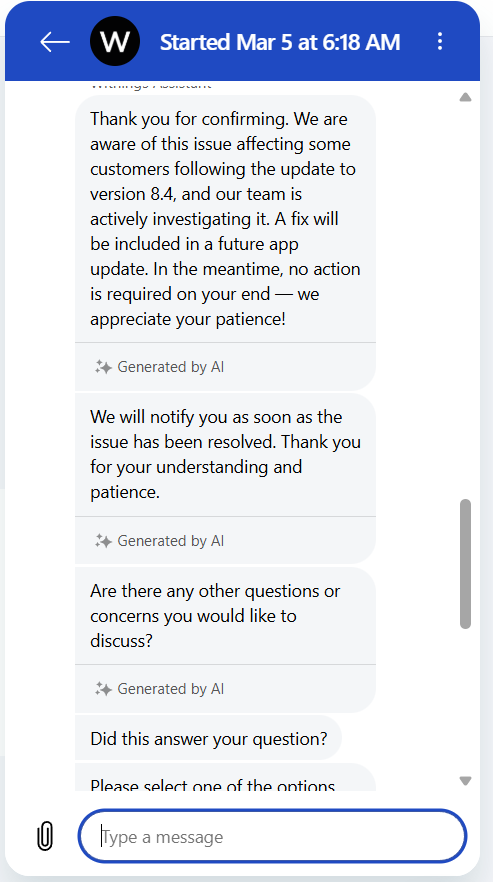
Your AI agent says you're aware and even has a link to your own website showing the problem. How about an update from your actively investigating team?

likes
After seing the app had updated to 8.4.1 on Android Samaung s25, I did the following:
Went into app settings on android settings and deleted all data.
Opened the app again and logged in so the setup could start.
This time when it asked for permission to search for devices, I denied that so it could not sync to my watch.
After that, everything seemed to work again, and after a while I allowed for connecting to nearby devices again in android settings. It connected and synced to watch without problems.
So far so good. Not sure if it was the new app version or if it was because I did not connect the watch right away.
Anyway very disappointing that Withings haven't updated this thread and informed of what they have done or what people need to do to make it work.
likes
V8.50 has not resolved anything, all issues persist. I still have the same issue as reported by Anton C
Looking at the web dashboard no data has been synced from my watch since early February, so 1 month of my smart watch not being a smart watch at all
likes
It's been two months and my watch hasn't worked. The 8.5 app now bounces me between logging in, only to reach 100% and ask me to log in again. I never reach the dashboard state. This is so unacceptable and shortly I will have to return my watch for a refund because it currently does not work.
likes
This is an absolute joke. There's no excuse for it to take this long to fix a bug. Hire some real software engineers.
Luckily I don't have a watch -- for those that do, get a Garmin - they're way better.
Unfortunately, my scale is a brick right now because it reset itself and now I can't set it up again. That's the only thing I use the crappy app for -- device setup. To look at my data, I just go to the web interface. I'll never buy a Withings scale again. When this one dies eventually, I'll probably get the Garmin scale or one of the many cheaper options out there.
likes
I created a new account and it is working fine, however I lost 12 years of measurements.
I downloaded 12 years data into another app.
They emailed me to say the problem is fixed, but I'm not prepared to spend any more time on troubleshooting this for them.
likes
I finally have a solution.
I also tried v8.2, and it had the same issue (for me). I'm going to go into my settings and prevent my phone from ever auto-updating the app. I don't know if it would, since I side-loaded it. And I'm keeping the 8.0 APK file around just in case.
likes
Leave your own comment
Leave a comment as