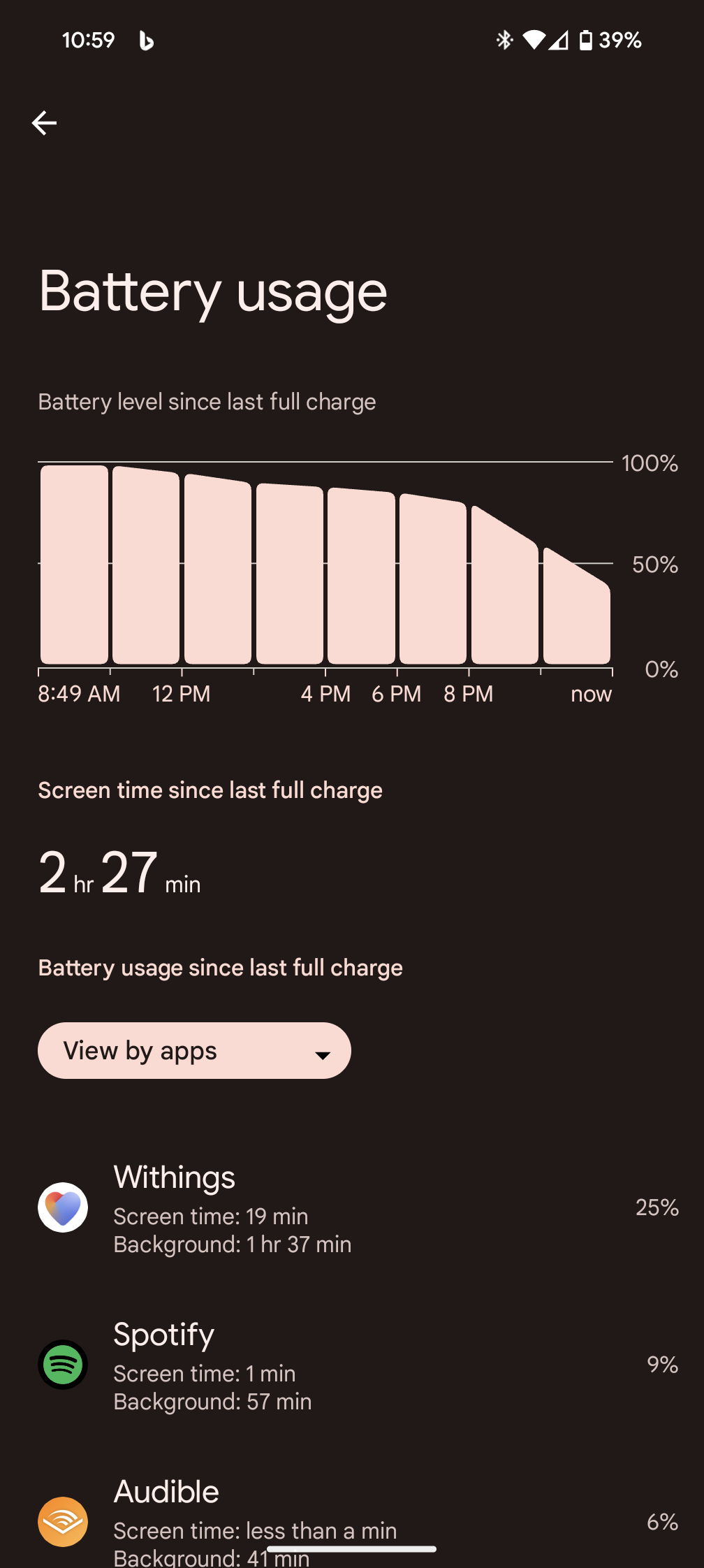
Battery drain with Withings App version 6.1.0

Withings App
Terminée

Commentaires

  • martin
    1

    j'aime

    As others have said - 50 to 60% battery usage by Health Mate app after Android 14 update
    Currently uninstalled and waiting for a fix...
    Pixel 7a

    1

    likes

  • ajtullio
    0

    j'aime

    Can confirm Android 14 on my pixel 7 if draining like 50% of my battery. I've been using it for years without issue.

    I find if I forever quit, it'll be ok for a while before the app fires back up and starts draining again

    0

    likes

  • Kim B
    0

    j'aime

    After around 24 hours of usage with 6.2.0 (Beta program through Google Play Store) it seems to be fixed. Sitting at the usual 0.2-.3% of battery usage!

    0

    likes

  • Daniel B
    0

    j'aime

    How did you get 6.2.0? Haven't seen it anywhere in the play store on multiple devices.

    0

    likes

  • ajtullio
    0

    j'aime

    The beta has no more open registrations available 😤

    0

    likes

  • norris.rob
    0

    j'aime

    Hey withings. Any comment on if the new version has a fix for the battery drain bug? If it has then wouldn't it be a good idea to tell us, and ask if we would like to test it for your?

    Please can we have some official info.

    0

    likes

  • Kim B
    0

    j'aime

    I'd assume they'll push the update publicly quite fast unless they encounter any issues with it. Hang in there!

    0

    likes

  • norris.rob
    0

    j'aime

    Sorry to be sarcastic, but I'd assume they'd be keen to engage with customers who are having a serious problem with their product. That doesn't seem to be the case though.

    0

    likes

  • Kim B
    0

    j'aime

    Oh I feel the same way, I've just been with Withings products long enough to know that won't happen. ;)

    0

    likes

  • norris.rob
    0

    j'aime

    :)

    I hope you're right and they roll it out quickly. It would just be nice for the people being paid to contribute to this forum to be as helpful as the ones who aren't.

    0

    likes

  • jkatz77
    3

    likes

    If we cannot get a clear timeline and plan to fix this, can we return our watches?

    I would prefer a refund as this is defective and makes the watch valueless. I have received no clear answer on timeline for improvement. Even the website support seems to be crashing, presumably because it is overloaded with complaints. 

    I specifically went with Withings, because it seemed reliable and simpler than most smartwatches, which i thought minimized the chance for bugs like this. 

    3

    likes

  • phaley1967
    1

    j'aime

    Agree completely. Refund please. I've removed the app and hence not even even wearing the watch now. They're not going to do well with all this bad publicity. Not even an updated official reply. Over it.

    1

    likes

  • Daniel B
    0

    j'aime

    Yeah it is getting a bit crazy. My Scanwatch Horizon has gone unused since the 6.1.0 release came out and I find myself using Fitbit or Garmin more now. I really liked my scanwatch but it is unusable while we wait for Withings to get their act together.

    0

    likes

  • Uwe H
    0

    j'aime

    This is pesty a.f. Trying 6.0.1, maybe this helps. Brand new Pixel 8 Pro working for 3 hours. Made my day the first time I encountered this problem. Ever tried to use your empty mobile phone as an ID device for public transportation?


    0

    likes

  • fabiangrundmann97
    1

    j'aime

    The battery of my Pixel 8 was completely drained within a few hours, and the device was getting warm even with the display turned off. (App version 6.1.0)

    The explanation provided by 'matthew.cowell' temporarily resolved the issue for me, but it disabled the notification function of my new ScanWatch 2.

    An app update, considering such a massive bug that can potentially render a smartphone unusable, should not take several weeks! I am extremely disappointed with Withings, and my trust in the company has been significantly damaged.

    Many thanks to Matthew Cowell!

    1

    likes

  • withings
    0

    j'aime

    Sorry, but contrary to what kimluminen wrote, I find 6.2.0 does not fix the problem. I enabled Notifications for about 2hrs and my battery was half empty. Notifications now disabled again.

    0

    likes

  • vigour1
    0

    j'aime

    Do you guys think that anyone from withings is reading this forum? At least I see some replies in the Play market comments, maybe if more people comment there, the impact will be higher.

    0

    likes

  • withings
    0

    j'aime

    @vigour1 I rather wonder if the Play market replies are actually written by an AI. They seem to follow the same form, and often largely ignore the content of the actual message. See the exchange with Jim Rasmussen, who after he says he uninstalled and reinstalled the app to fix the problem is advised to uninstall and reinstall the app!

    0

    likes

  • cavjjc
    0

    j'aime

    Received today................. not much help, not much hope?!!


    Nov 29, 2023, 10:42 GMT+1

    Hello,
     
    Thank you for contacting Withings Customer Support. My name is xxxxx, and I’d be happy to help. I'm sorry to hear that your Withings app appears to deplete the battery of your phone.
     
    I appreciate the information you shared in your email. 
     
    To address your question, please know that our development team is already aware of the issue and is actively working to resolve this.
     
    In the interim, you can try to turn off the Bluetooth on your phone when you don't need it. Also, try to dissociate the devices connected to the Withings app.
     
    You may also perform these troubleshooting steps in the meantime:
     
    Clear the Withings' app caches
    Delete and reinstall the Withings app
    Turn off Withings app notifications (Settings → Notifications → App settings → Turn off notifications)
     
    Thank you for your understanding regarding this concern.
     
    Have a good day, and stay safe.
     
    Best regards,

    xxxxxxx
    Customer Service | Withings

    0

    likes

  • joysofjoyc4
    0

    j'aime

    In my case downgrading the app to 6.0.0 has been working "wonders", which in this case means normal performance and usual battery drain 😂🤣

    0

    likes

  • Daniel B
    0

    j'aime

    So tried out 6.0.1 on my Pixel 8 Pro and S23 Ultra, no change for me in battery, seems to be an issue with Android 14 and Health Connect. I also tried it with 6.0.0 and I got better results but still had crazy battery. The better part was my watch would actually sync with my devices without locking up but in a 1.5 hour indoor workout (no GPS) I went from 77% to 35% with Spotify in the background. For comparison I would normally only lose 5-10% when using my Garmin Fenix 7, Galaxy Watch 6 or Pixel Watch 2 when doing and outdoor workout with GPS. The screenshot is from downgrading to 6.0.0

    0

    likes

  • Kim B
    2

    likes

    After four days of no increased battery drain with 6.2.0, it's sadly begun again... Back to 6.0.1 hoping it still works, and of course hoping that Withings realises that this should be their highest priority as it makes their watches borderline unusable.

    2

    likes

  • andreas.boehner
    0

    j'aime

    Same here on the Pixel 8 Pro - also turning off the notifications did not help at all...
    It is all drained in the Background...
    5 Min of Screen on time ... 13h in the background (and they were only possible due to recharging inbetween) - nearly 70% battery used by withings health...

    Quite a horrible experience ...
    Cause I have no option to delete the app as I have the scale, blood pressure and thermometer too... and want to use them


    Preliminary solution that worked at my Pixel 8 Pro:

    1 step: Turn notifications withings the app- ettings of my watch Off

    -> still draining the battery like shit

    2 step: Go to battery usage -> click on the withings App -> Change from Default "optimal" to "restricted" Close... And then the Same Back to optimal a few minutes later 


    Since then it seems to revert back to normal

    0

    likes

  • FAbWithings M
    1

    j'aime

    Hi,

    On Thursday 23rd november I've uninstalled app v 6.0.1 (six zero one = previous version) and re-install v 6.1.0 (six ONE zero, the last one). Then I've activated notifications but masked the permanent one. I've had to fix permissions again.

    Problem are gone in _my_ case.

    I don't known if it's an exception or if it's the begining of a solution. May this is help.


    I was in relation with french support team and they have my report.

    I'm not completly sure that v6.1.0 was the same as the one which battery issues.
    I don't understand why it's so long to have a fix or new version.

    It's a critical issue.

    1

    likes

  • vastl
    0

    j'aime

    Great service, withings! I removed all withings stuff and am wearing my old garmin again - without any problems!

    And: My s22 works for days now. Seems, 6.** firmwares had a drain problem either, only not so big.

    A pity with all my withings stuff - who will buy this garbage???

    0

    likes

  • jakub.karasek
    0

    j'aime

    Me and my wife having same problem, the battery percentages on our phones are literally disappearing in front of our eyes - Galaxy S22 Plus and Galaxy S23 Ultra, both with Android 14. 

    0

    likes

  • jb.dude
    0

    j'aime

    The problem is not just isolated to Android 14, unfortunately; I'm on Android 13 TKQ1.221013.002 and seeing the same problem with 6.1.0.

    I don't know when it started, but I've rolled back to 6.0.1 and will see how it goes.

    0

    likes

  • ajtullio
    3

    likes

    Finally had enough. Had to uninstall. I can't even leave my house for a few hours without my phone burning a hole in my pocket and dying within a few hours. All my watch does is tell time. I could get a watch that does that for SIGNIFICANTLY less money.

    3

    likes

  • test2
    1

    j'aime

    Dave here. The app kills my battery in a few hours. Pixel 6a with Android 14.
    I downgraded my app a month ago and it fixed the issue. Android just upgraded it. I forgot to disable auto update
    Hey withings !!! Fix this!!

    1

    likes

  • Terry K
    0

    j'aime

    Been waiting for the fix (Pixel 6) for quite a few weeks - Withings last update is 20days ago and it's not enough so  had no option but to use the nuclear option of deleting the app. Throws the plan to upgrade at xmas into touch. I'd advise honestly - don't mark it as 'answered' but 'under investigation/fix' or something and communicate more. There are other options 

    0

    likes

Laissez un commentaire en tant que