Battery drain with Withings App version 6.1.0

Withings App
Terminée

Commentaires

  • vastl
    0

    j'aime

    Ok, lets hope, it wont last long. It a.p.i.t.a. !!

    BTW: It looks, as if the drain occurs not permanantly. One night my phone was empty, other night nothing occurs.

    Very strange...

    0

    likes

  • joysofjoyc4
    2

    likes

    @mirza.arnaut45, I used another method, which is rating the app 1/5 in Google Play, referencing this thread in comment linked to the rating. Hopefully, our common efforts will come to fruition :D

    2

    likes

  • tomyblu
    2

    likes

    There's also an advertising campaign on Facebook for the Scanwatch light.. I may have put the concerns on there too!

    2

    likes

  • r.minelli88
    2

    likes

    Hello,

    I reached out to Withings Support — they told me they will investigate into the issue 🤞

    For those who downgraded: which version did you install? Where did you get the .apk from?

    2

    likes

  • joysofjoyc4
    0

    j'aime

    In my case it was 6.0.0 downloaded from: https://www.apkmirror.com/apk/withings/nokia-health-mate/nokia-health-mate-6-0-0-release/

    0

    likes

  • Benjamin B
    2

    likes

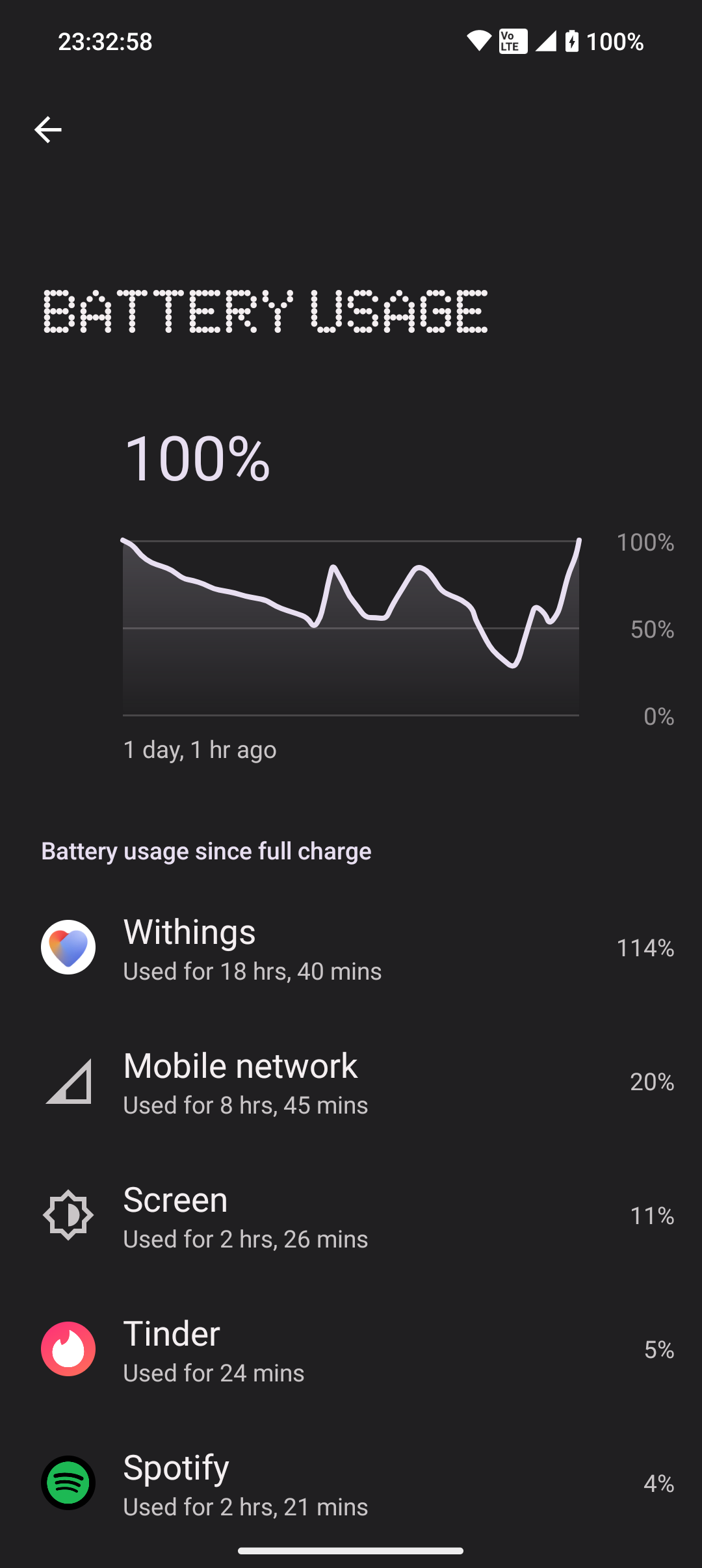
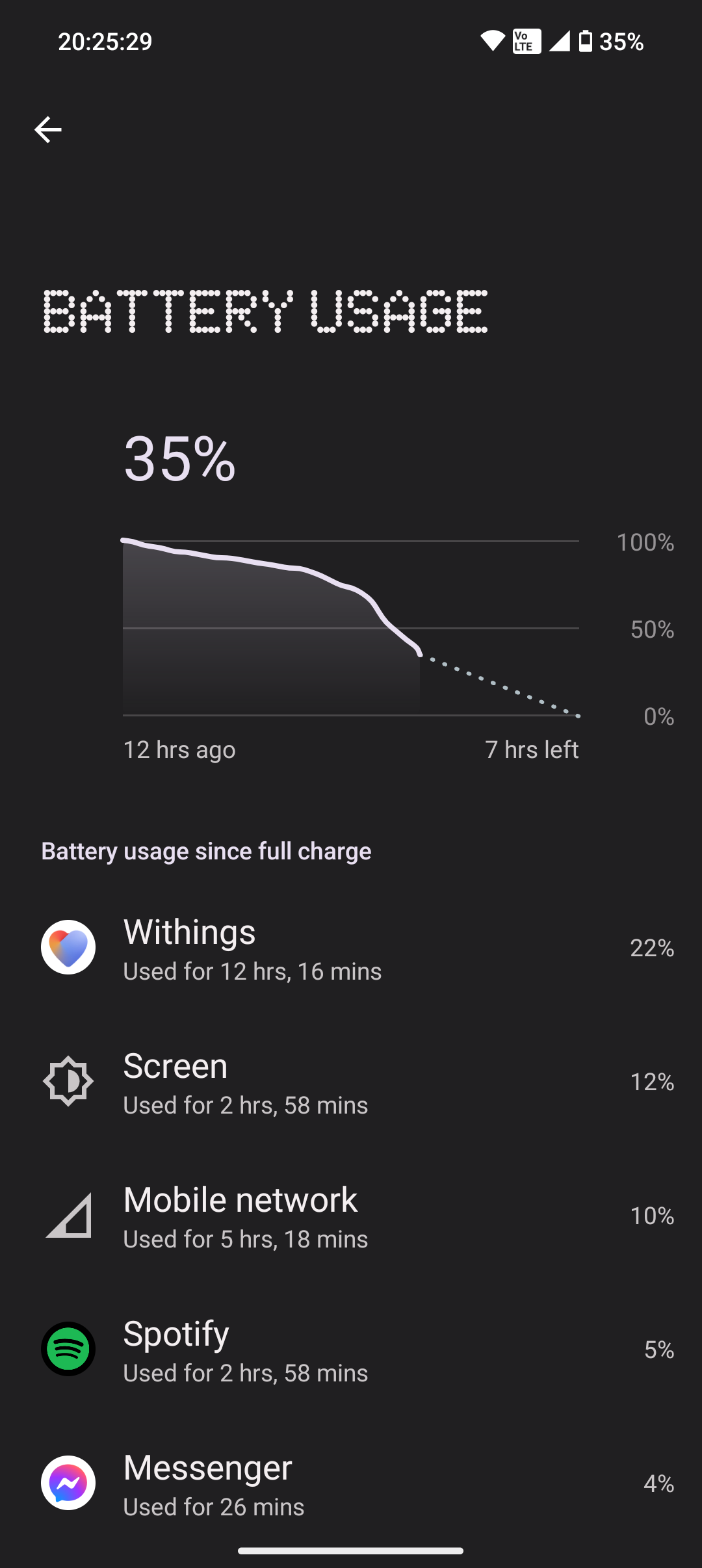
    Let me just attach some fun screenshots... I've tried quite a bit... so glad to have found this tho... But the battery just starts to plumiting, like crazy!Though 114% is quite funny - and to see it charges as fast, as it drains :))) *.... The only thing that works, is dissociating the watch ... then consumption stays normal for anything between 12-20 hours** But then it just takes a dive! 

    At worst I can't go anywhere without a charger. Battery drops 10% in passive state in an hour. And had it chuck away 11% while on public transport to work - that was barely 30 minutes of active, but not continuos use. 

    Nothing Phone 2, Android 13, Nothing OS 2.0.4

    I'll try reverting to 6.0.1

    Update: 12.11.23 - Been on 6.0.1 for 3 days now, and having normal battery trend. So happy about that. Sad to see it doesn't work for everyone. Eagerly awaiting fora n update for the app...

    *

    **

    2

    likes

  • Permanently deleted user
    1

    j'aime

    Same thing happened to me.
    I found that turning off the phone to watch notifications stopped the battery drain. Well it has so far...
    I contacted support and they've said it's with the developers. Maybe they'll test it this time :-(

    1

    likes

  • phaley1967
    1

    j'aime

    Same issue with Pixel 6 Pro. Ridiculous usage even with app set to restricted. Fix please ! The whole Withings experience is getting somewhat "draining" on more than the battery !! 

    1

    likes

  • Artem L
    0

    j'aime

    @Armelle - unfortunately, I can't access the link you sent. All I get is the spinning indication that the page is loading - but nothing beyond that. Chrome on MacOs Sonoma.

    0

    likes

  • Glenn S
    1

    j'aime

    Awful that this has not been fixed by now. Have been happy with my Scanwatch for 2 years but this unresolved issue has discouraged me from considering other Withings products. My Pixel 7 has been draining at a 59% rate and am about to delete this app and maybe look for a replacement watch like Pixel Watch 2. Very disappointed that Withings is not on top of this problem and have a fix by now.

    1

    likes

  • michael.wong110
    1

    j'aime

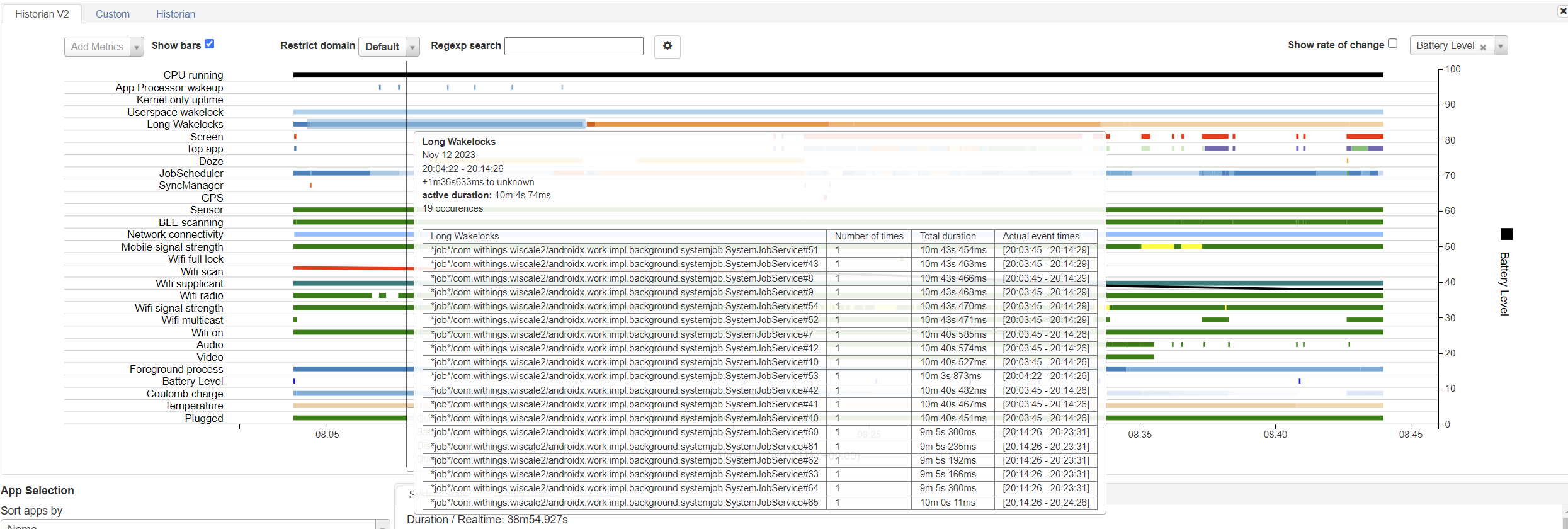
    Also having the same problem on Android 14, tried downgrading to 6.0.0 and disabling notifications didn't help. This is what battery historian shows

    1

    likes

  • Matt C
    14

    likes

    I found what was causing the battery drain on my phone.  It's the background sync process for my Scanwatch consuming 100% of one CPU core.  Thread name is "HWA09 ##:##:## reverse" (blanked out my serial number).  The trigger is when there is a notification forwarded to the watch that contains an emoji.  It's really easy to reproduce by just sending yourself a text message that contains an emoji or by configuring a calendar event that has an emoji in the title (provided those are configured to be sent to the watch).  The icon of the app that generated the notification pops up on the watch, but not the text of the notification itself.  Then the battery drain starts.

    Note that disabling watch notifications on its own will *not* stop the battery drain.  Once the battery drain starts, the only way to stop it is to "Force stop" the Withings app.  Even disabling Bluetooth won't stop the battery drain once it starts.

    Until Withings fixes this, I'd recommend to either disable notification forwarding for any app which may use an emoji, or disable notifications entirely.  Then "Force stop" the Withings app and restart it (this part is important).  It's possible there are other sources of battery drain, but this is what was causing mine at least.

    14

    likes

  • Glenn S
    2

    likes

    Thank you @matthew.cowell. One would think Withings would have investigated and fixed that coding error in the app by now instead of telling us to "have a nice weekend." I had seriously been looking into buying one of their other products after being satisfied with my Scanwatch for the past 2 years but looks like this issue has negated the good will they have built. Hard to believe folks would be buying their recently launched watches and immediately have to figure out why their smartphone batteries are drained.   

    2

    likes

  • michael.wong110
    1

    j'aime

    I think there's a separate issue as I reinstalled the app and never enabled notification sync/forwarding and it was still draining

    1

    likes

  • Ben B
    0

    j'aime

    Same here with Onplus 10pro 5G.

    0

    likes

  • vastl
    0

    j'aime

    thx for the helpful wishes, dear support!!! I had indeed a good weekend, after going back to my garmin...

    The supportlink asks for a serial number - what the f... is that???

    I m not shure the drain ist stopped with 6.0.1 for my phone was quite down after downgrading - what was realy easy just as said here - thx for the help!

    B.R., Mike


    0

    likes

  • Mirza A
    1

    j'aime

    @vastl I also experienced batter, drain issues after downgrading, but the reason was that the play store updated the app in the background to 6.1.0 again...

    1

    likes

  • r.minelli88
    2

    likes

    Mirza you could disable automatic updates per that specific app.

    To do so:

    1. Open Play Store
    2. Find the Withings Health Mate app
    3. Click on the three dots top right
    4. Unckeck the flag "Enable auto update"

    Best,
    Roberto

    2

    likes

  • vastl
    1

    j'aime

    Yeah - i had indeed an update yesterday - 4 days after downgrade, while i thought, i had switched off automatic updates. Ookay - same procedere as last week.

    1

    likes

  • tgunkel-lists
    1

    j'aime

    Whan are you going to fix this? I was just left without a phone due to this stupid bug. Very unhappy with the way you are (not) handling this for so many days!

    1

    likes

  • rayhunt99
    2

    likes

    Don’t hold your breath on getting anything from support in a hurry. I have had a case open with them since Nov 2022 and they have done sweet fa with it! If I chase, after about three weeks I get a default response of “devs are looking into it”. I’ve given up chasing and they haven’t updated me for 3 months now.

    This latest debacle with battery drain is the last straw for me

    2

    likes

  • haileah2
    3

    likes

    Withings support responded to my submission and their suggestion was to force stop the app and/or turn off bluetooth. There was no suggestion that they intend to fix the bug and insinuated it was not the app causing the problem. Totally unacceptable.

    3

    likes

  • pavel.azroyan
    2

    likes

    Yeah, I was thinking of upgrading to a ScanWatch 2 during a sale but with this speed and quality of software support, I'm not so sure I should invest more money into Withings platform.

    2

    likes

  • senator.weber
    0

    j'aime

    The solution from matthew.cowell worked for me. Even if it can only be temporary to deactivate the notifications permanently.

    0

    likes

  • tgunkel-lists
    2

    likes

    The current answer: "it seems that Android 14 can lead to some unusual battery drain" does not seem to be right, I am on Android 12 and still have the problem.

    2

    likes

  • Pedro L
    1

    j'aime

    My wife has experienced this problem with her phone, but oddly I have not... for context, we both have Pixel 7 Pro phones and Steel HR watches!

    When I check the battery usage on her phone, Withings is by far the #1 app responsible for the battery drain!

    I have tried matthew.cowell solution on her phone and can confirm that it does indeed seem to fix the problem (in her case, I disabled notification monitoring of every chat app from her phone, but kept the others that I do not expect to send emojis on messages)

    I really like my Withings watch and hope they can fix this issue, as this is quite bad right now...

    I'm a software engineer myself (and a couple of years ago, I worked for Withings former owner, Nokia) so I get that sometimes bugs do slip through, but this is a really bad one and I would expect it to be a P1 bug that will be fixed ASAP on the next Withings app release!

    1

    likes

  • vastl
    0

    j'aime

    Its 2 weeks now and Withings gives no solution, not even the here given workarouround. Thats really poor and let my doubt, the withings is the right choice.

    BTW. 6.0.1 works fine, update auto is closed. And as a wish: Let us edit a workout whwn finished. I often forget to stop it and have 2 or more hours cycling...

    0

    likes

  • Leslie T
    0

    j'aime

    Using a Samsung Ultra22 and Android 13. Same problem..drains my phone battery in a few hours.

    I only noticed this happening when I activated a new "program" (now in week 2). Coincidental to that new program, I "reactivated" an HR Steel I'd loaned a friend. I have both the HR Steel and the ScanWatch and I go back and forth between the two, wearing the HR Steel (it's older) when I'm in the pool or ocean. 

    0

    likes

  • n.baker1001
    0

    j'aime

    Same on Samsung Galaxy A52s phone with Android 13, so much for it being Android 14. I've had to deep sleep the app for now as it's killing my battery life.

    0

    likes

  • swytchy
    0

    j'aime

    Same problem here. I've deleted the app.
    Following this thread to see if / when I can reinstall.

    0

    likes

Laissez un commentaire en tant que