App Says Connected to Watch but will not sync
176 comments
39 likes
likes
176 comments
39 likes
likes
Tried the TestFlight workaround, which is OK for now. However my notifications now aren’t working correctly - the Withings app isn’t picking up certain apps in the notifications list (eg MS Teams). This happens from time to time anyway, and is usually sorted out in updates, but I thought it worthwhile noting here. At least the watch is more or less working again for now
likes
I have the same problem.
Nokia Steel HR & Iphone 8 (IOS 16.7.10).
Waiting for quick solution.
Thank you in advance!
likes
Last night, as I wrote, I solved it using Apple's TestFlight which allows the installation of a previous version, for 60 days, at least while waiting for the situation to be resolved.
I was in direct chat with Withings support, describing the problem and bringing them to this thread so that they understood how many were with the same problem.
Clearly the APP update to version 7.2.0 affected many iOS devices, we are talking about old devices with iOS up to version 18.1.1 (certainly up to the iPhone 12).
The problem could be linked to the approach of Bluetooth with respect to the devices, as on the new ones it works in a different way, to consume less battery and this could have compromised the communication between smartphones not of the latest version and steel hr.
Last night I updated to iOS 18.2.1, and Withings support suggested that I then update the APP to version 7.2.0, but frankly I don't trust them as it seemed that they weren't yet fully aware of the problem and acting as testers, no thanks.
likes
I was able to reconnect my watch using Apple's TestFlight (version 7.1.1). However, I’ve lost the data history from the past 6 years, and I’m really disappointed. Does anyone know if it’s possible to recover this history and how to do it?
likes
is it just me or 7.1.1 version is no longer available in TestFlight?
likes
@Laurence C, your data *should* be linked to your account.
It’s worth double checking you’re signed in to the test flight app with your original account details.
I’m currently using 7.1.1 via TestFlight and have access to all historic data.
Hope this helps
likes
I haven't yet rolled back to the old version via Testflight. I'm (naively) hoping someone from Withings will actually try to fix this or at least read this thread, and I might be able to help them "test".
I upgraded my iPhone 15 Pro to 18.2.1 and re-installed the 7.2.0 app. As expected, no change. Stuck on the "Connected to your Steel HR" screen.
I will reply to my ticket with this information.
likes
Mark B thanks for your comment.
Thanks also for your feedback, which confirms that even with the iPhone update to the latest iOS version, and reinstalling the APP to version 7.2.0 nothing changes.
I preferred to use Testflight to return to using my Steel HR which is useful to me for many issues regarding my health, and in any case it covers 60 days.
Every time I start the application it asks me if I want to update it, but I answer that I don't want to do it, at least until I read official news of a 7.2.1 update that solves the issue.
likes
I only just noticed I can see my "request" here
https://support.withings.com/hc/en-us/requests
No progress on it. But at least I can see they haven't closed it.
There must be many more users impacted by this then those who have found this thread.
likes
I @-ed them in twitter, they pretend they have never heard of a problem. The more publicity the better for us i guess.
likes
I also have sync issues as of the latest update. Hoping for a quick fix or roll back from Withings…
likes
I finally got the TestFlight to open without an invite, but it reinstalled 7.2. How do I get the previous version?
likes
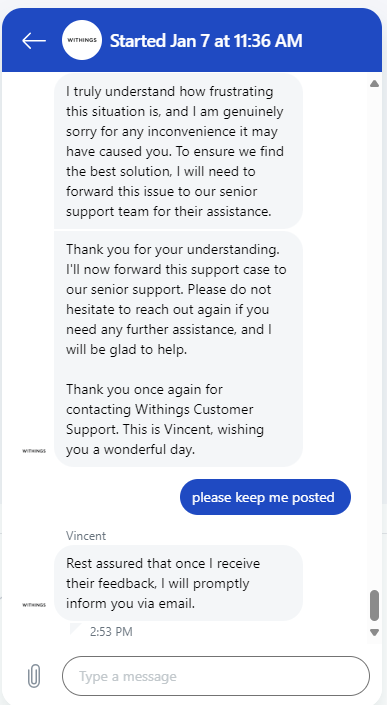
Just had the Support in the chat again. They will refer to the senior support manager, no other concrete hint on what is going on an when it will be solved. 
likes
There’s an official reply at the beginning of this thread for those who haven’t seen it arrive.
likes
Tammy, look for "previous builds"
likes
Thanks Markus from Withing to communicate about the issue.
However I still see 4 problems here :
I expect withings to solve the issue quickly, provide insight about how they will improve their QA process and how they intend to build back trust.
It is highly unnaceptable to buy a harware and cannot use it because of an app update.
I never heard any issue of this type from any other manufacturer. My wife uses Garmin and make fun of me because it takes a lot of time to get my activities on Strava compared to her. NEVER heard anything from my friends who uses Garmin, Apple Watch, Polar and other brand.
I was checking last week to upgrade my ecosystem (scale and new watch) but now I'm checking Polar and Garmin.
likes
I'm pleased the issue has finally been acknowledged.
I'm curious about the statement " certain Steel HR devices". Is it only a small percentage of Steel HR watches impacted?
If it is only a small percentage, it could explain why it wasn't found in testing. The Steel HR they tested with might have worked fine. If there are many variations of Steel HR (e.g. FW versions), they can't test them all.
Or maybe it really is all or most Steel HRs.
Again, just curious. As a retired software engineer.
I will now wait.
likes
My problems started when I switched time zones... always a dicey effort for my watch, but I ended up trying to calibrate, didn't work, kept going backwards, reinstalling the app, resetting to factory, and eventually stuck on the connection issues. I tried using the chat support on Withings, utterly useless. Here it looks like its been going on for three days, the support chat had no reference to a known issue.
likes
Mark, look deeper :-) Certain HR devices can easily mean „all smart watches“. Withings is focused on scales and other devices today, steel hr is not the most important. I bet they are just not testing legacy hw.
likes
Thanks Aleksandr. You may be right.
likes
Steel HR is not in their product line anymore, it is probably out of scope of any regression test when publishing an app update. Good to focus on new features and new stuff, but existing customer who paid 200$ for their watch are just left on the side of the road in this scenario. It does not take long to notice that Steel HR does not work on the new app. Basically just open the app on Iphone with a Steel HR connected and any not-so-sharp-eye should see the pb right away.
As a french company, they have to follow certain rules concerning planned obsolescence. In this case, force an app update to make the hardware un-usable could be considered as planned obsolescence. Fine is 300k euros to 5% of annual turnover. (in french : Obsolescence programmée : loi et sanction)
Obviously this is not deliberate here, just them being lazy and not take into account "old" hardware :)
likes
Same issue, watch is unusable, and app hanging in "Connected to your Steel HR" with a spinning wheel. Watch says "setup" with a heart icon, but nothing happens when I press the button or try to go through the steps to setup. This is after multiple factory resets and telling my iPhone to "forget device".
likes
Updated iOS Withings App from 7.1 to 7.2 caused the Steel HR to stop syncing with the app. Then the app was not able to control the watch. Tried to remove the watch and reinstall and got stuck on "Connected to your Steel HR". Tried to add the watch for a few hours. The watch easily adds to the Android Device/Older IOS-Older App.
This is very bad painful experience. Now I have the scale and blood pressure monitor is syncing with IOS 7.2 app account (connect to apple-id) and Watch is syncing with Android app (connect to google-id).
Withings support - If you want THE CUSTOMER to use your company's product which help monitor their health then you need to test your software before you release buggy releases. This is BAD EXPERIENCE and NOT SETTING TRUST to continue using your product.
likes
I have installed 7.1.1 with TestFlight. Watch is working. Thanks to those who shared the information.
likes
Glad to see its not just me! I just went to fix the time on mine as the analogue clock was out from the digital clock.
Hopefully it's fixed soon. Maybe I should of just ran 7 minutes late to everything
likes
Same here! I’ve reset my HR in the hope that it would work, before coming on here, and now it won’t get past the “your device is connected” page so I can’t even set it up again now! I hope there’s a new update soon as I can’t even use my watch at all now!
likes
I have exactly the same issue. Using testflight to install an older version worked to connnect to the app, but now it doesnt read my old data (weight, sleep, heartrate) anymore. The data is still present in apple health and all write and read rights are enabled. I tried reinstalling, disabling and enabling rights. Background refresh is on. At first I was very content with Withings watches but I am getting more and more frustrated. My wife has a withings scanwatch and her crownpress has also stopped working after 2 years and 4 months (apparently also a very common problem) just after warranty. Customer service is near impossible to reach, so eventually gave up. Hopefully this issue with the software update will be fixed soon or we will switch to another brand…
likes
Just adding my name to the long list of users having exactly the same problem with my Steel HR, in case Withings cares about the number of impacted users ! For the moment, I can't find the 7.1.1 version with Testflight (not familiar with the app), but I'll keep looking.
likes
Hi Phil B, if you have Testflight open and have loaded the beta test Withings app in it (via this link https://testflight.apple.com/join/W6nOwUHe if you haven’t), you should be able to open it up and scroll down to the App Information section (second section from the bottom). There is a Previous Builds option that you should be able to click on and from there you can roll back to the previous version.
likes
What can I say, me too, as of yesterday! :(
Waiting for the iOS app fix.
likes
Leave your own comment
Leave a comment as