App Says Connected to Watch but will not sync
176 comments
39 likes
likes
176 comments
39 likes
likes
Thanks a lot Jeff G. After some difficulty searching in the French version of the app, I managed to find and install 7.1.1. It does work, and my history is still there. Just hoping they find a real fix before 58 days !
likes
Can someone tell me how to find the old version of the app?
likes
@Lucy C
1. download Testflight from the Apple appstore
2. Access the Withings beta tester programme here https://testflight.apple.com/join/W6nOwUHe which should open in Testflight
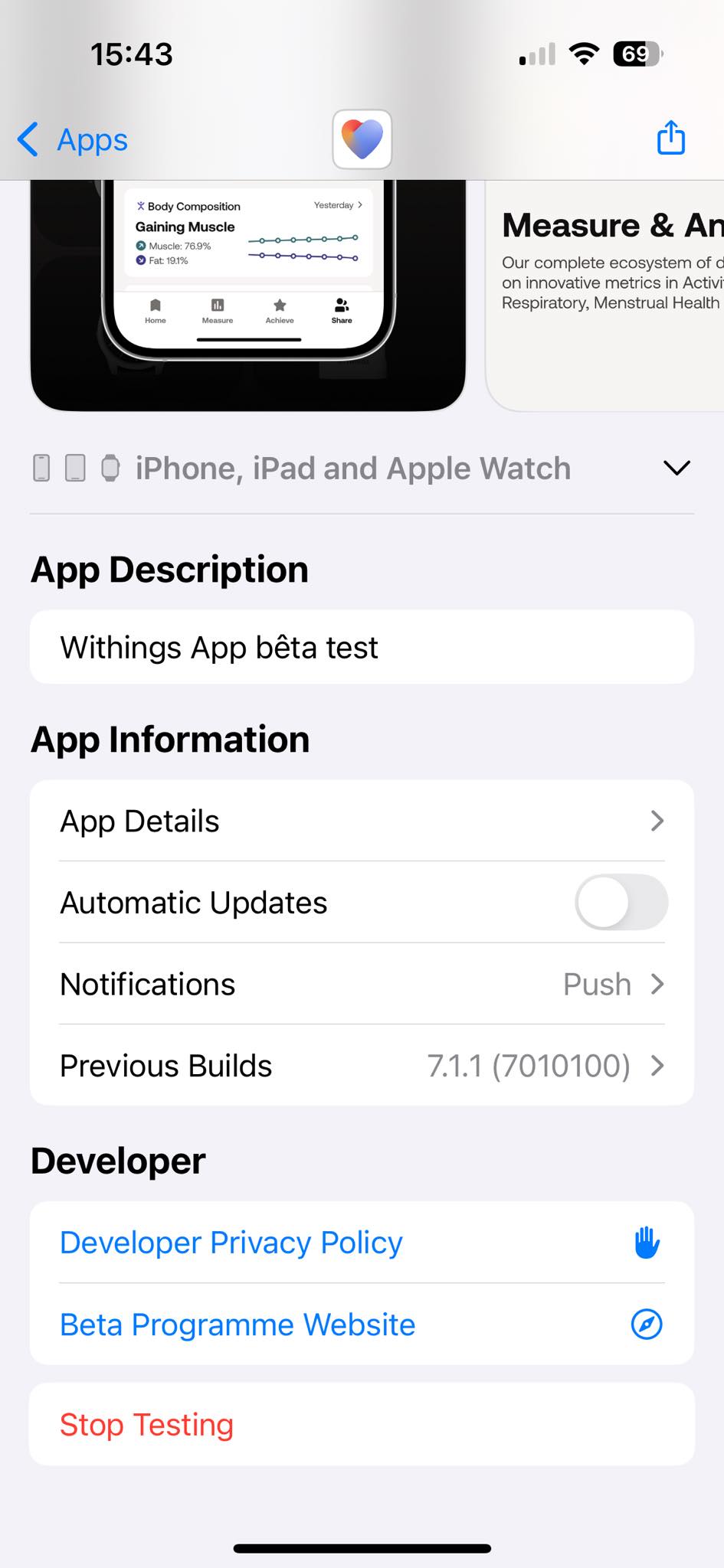
3. Open Withings in Testflight and scroll down to the App Information section (second section from the bottom). There is a Previous Builds option that you should be able to click on and from there you can roll back to the previous version.
likes
Thanks @Jess G.
But cannot find the "Previous Builds" option when on Testflight. So it only downloads v7.2.1, which definitely a disaster.
Is there another way to go around it?
My watch (Steel HR) is completely not working any more...
likes
@Jess G Thank you so much. I’ve found the previous version and can actually use my watch again!
likes
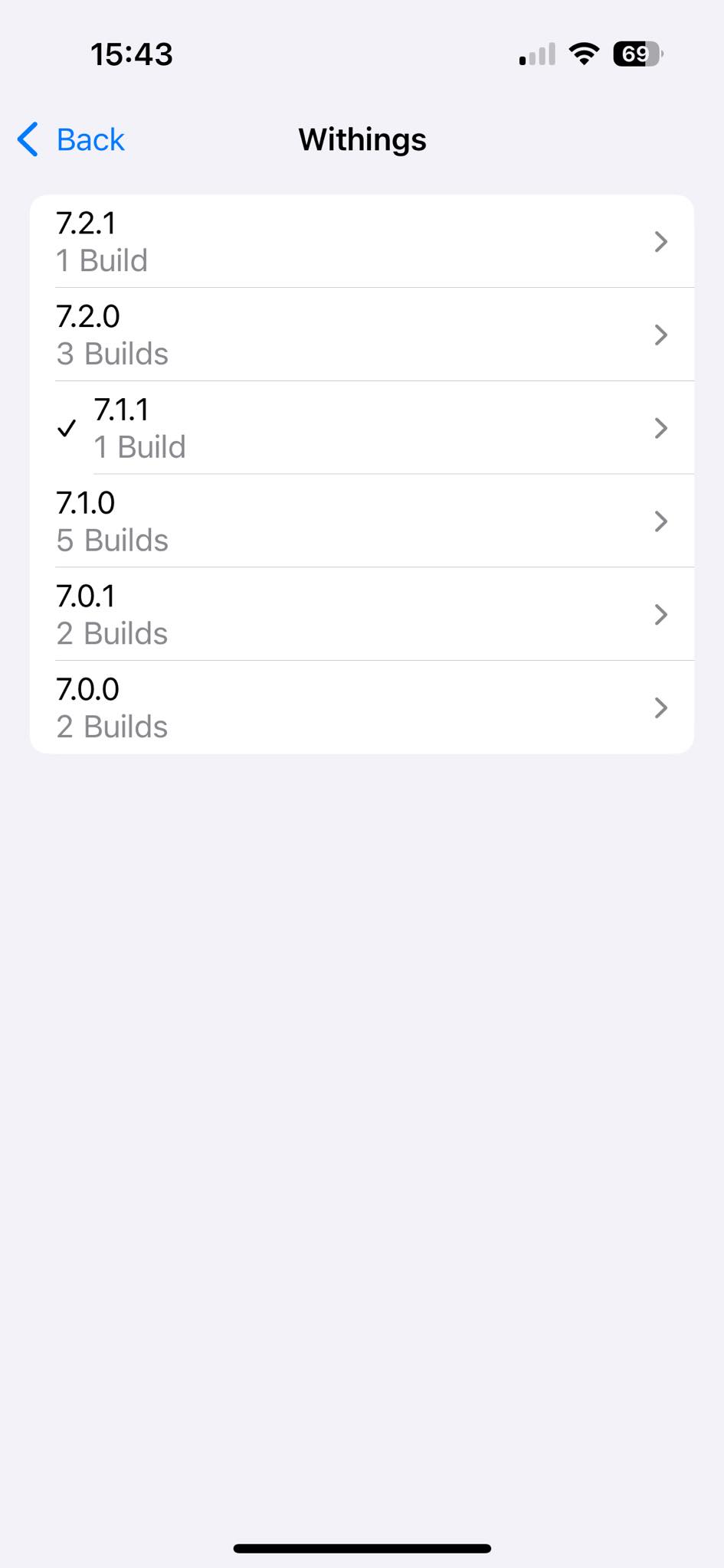
See screenshots below.
Note 7.2.0 was the problem release. 7.2.1 might be the new one with fixes? 7.1.1 is the previous, proven one.


likes
I have installed 7.2.1. The 3 alarms are back, communication with the watch seems to work for me.
likes
Same Olivier! Looks good at the moment 🤞I’ve also tried factory resetting and re-syncing my watch and all seems to work!
likes
7.2.1 from TestFlight confirmed to work fine for me.
likes
7.2.1 also works fine for me. I did a factory reset on my watch and could reconnect it without any problem.
I hope this version will be available soon in the App Store.
likes
Worked for me too! My steel HR is back... I was about to abandon, you should send an email indicating there is an error with the last update and be transparent, not doing so will push a lot of people to change to another watch/brand thinking is a technical issue on the watch. I was about to abandon withings and I checked support with very low hope until I found this forum.
likes
Can you post the last version, so I can at least get my watch working until you find the patch.
likes
I’m in the same boat since I updated yesterday. Just adding my comment so hopefully WT can see how many people are affected. Currently working after using Flight Test. Thank you!
likes
TestFlight good solution for now. Amazed that support reps did not get informed of the issue so we could have been told when we contacted support. Would have saved a lot of frustration for us and support
likes
A great example of a terrible contingency management.
likes
This is also happening to me since Sunday 05/01/2025. I was using the steel HR sports. Really love this watch. Now I bought the new scan watch 2 ... more expansive but look less sporty :-/ please solve update issue so I can go back to use my Steel HR sports
likes
Thanks everyone. It feels better that I’m not the only one with the problem and I appreciate the work around. I’ll check it out. The alarm feature is the whole point of me having this watch. Boo on Withings.
likes
Hello, i have the same issues as all the other users and would really appreciate a fix up of the matter. Hey Whitings guys, do your best !
likes
Just went to 7.2.1 - all seems to be working fine
likes
Thank you Jess J!
likes
I would like to thank Aleksandr A who gives the solution with testflight and a link for beta tester.
likes
Hey all. Updated to 7.2.1 today via TestFlight. No data loss, alarm function and sync seem to all work. Message notifications seem to have stopped though, anyone experiencing this?
likes
Has this been rectified now as still seem to be having the same problem? Thank you - C
likes
It’s not officially resolved. There are versions available using TestFlight.
likes
How do I do that - I have downloaded TestFlight app but have received no email - thank you
likes
In a previous post from Jess G
1. download Testflight from the Apple appstore
2. Access the Withings beta tester programme here https://testflight.apple.com/join/W6nOwUHe which should open in Testflight
3. Open Withings in Testflight and scroll down to the App Information section (second section from the bottom). There is a Previous Builds option that you should be able to click on and from there you can roll back to the previous version.
likes
That is so helpful - thank you. I don't seem to receive an email from a TestFlight developer.
likes
@ Camilla G, you don’t need an email - just click on the link Mark shared and it will open in Testflight if you’ve downloaded the Testflight app from the appstore
likes
Hello,
Thanks for the help. Testflight version 7.2.1 works for me too on iOS 18.2.1.
likes
Thank you all for your help - it seems to be working now. Amazing. thank you. C
likes
Leave your own comment
Leave a comment as